EDC
Collect data at the visit, check missing fields and trace the changes that matter to a study reviewer.
Learn more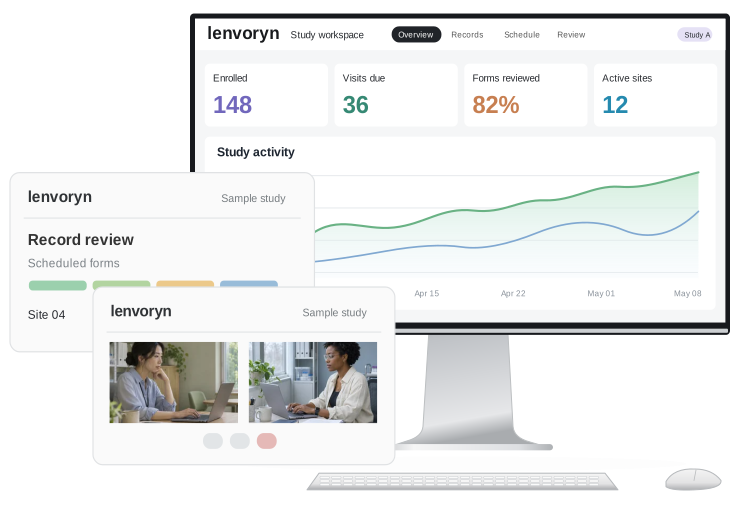
Collect data at the visit, check missing fields and trace the changes that matter to a study reviewer.
Learn moreSchedule participant diaries and bring responses directly into the study workspace for the coordinating site to review.
Learn moreConnect a remote appointment to its visit form and keep follow-up actions visible to the people running the site.
Learn more
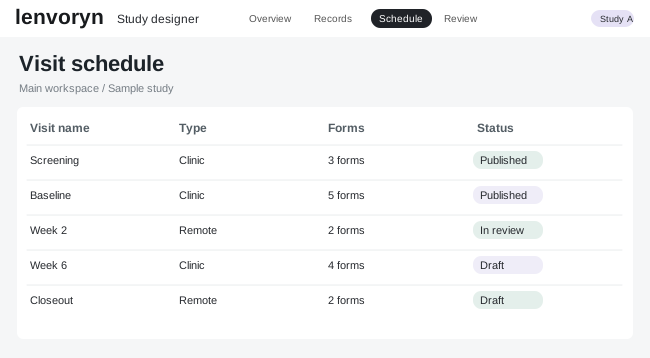
Turn a visit schedule into a working form and walk through it from the coordinator’s point of view. The team can see which records are ready and which visits still need attention.

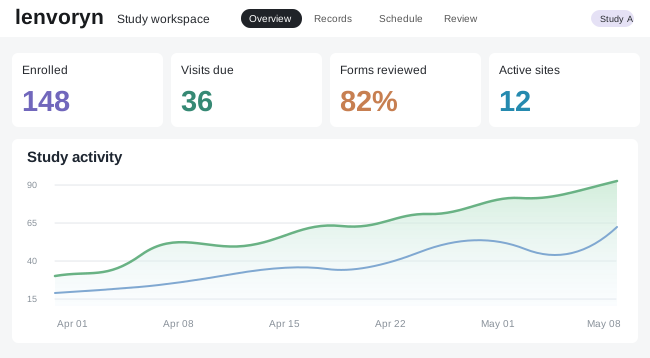
Scope each project around its visits, sites and people. Start with electronic data capture, add a participant diary or remote visits, and keep the modules visible to everyone planning the study. Review the same scope as new sites join.

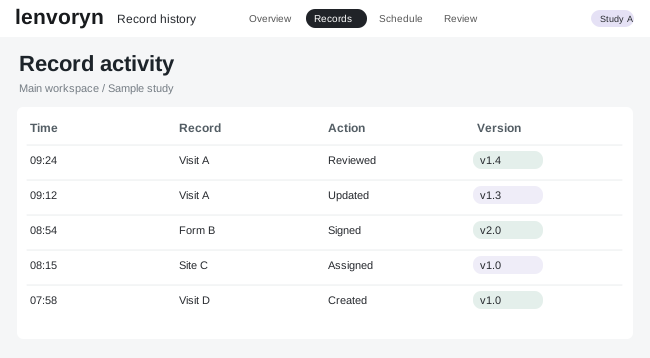
Follow a record from its first entry to a final review. Coordinators can open the underlying visit, see exactly what changed and hand the next action to the person responsible.
From the first visit form to the final record review, explore the roles, tools and guided workflows that make up this sample clinical study environment.
Explore the modules for site data capture, participant diaries and remote visits alongside the operational tools that support each study team, from the first scheduled visit to closeout.
Walk through sample records step by step. Open a visit schedule, inspect the dashboard or follow a suggested coding term all the way to the reviewer’s recorded decision.
Sponsor, contract research and medical device teams can each explore the platform through their own study responsibilities, starting from a shared set of sample records.
A shared workspace brings scheduled visits, open forms and review decisions together. Open an individual record to see its owner and trace the detail behind the next action.
Follow illustrative projects from initial study design through site review. Each scenario shows how a sponsor or a contract research team uses the workspace to answer a specific operational question.
Follow a participant diary from its first invitation to the site review. The example shows how a sponsor can see open entries and when a coordinator needs to follow up.
See the scenarioLook across the visit schedule for outstanding forms. The project team can return to the underlying record, see the action owner and decide which visit to review next.
See the scenarioA contract research team sets up a common visit plan across several sites. Follow one change from the template to the coordinator’s next scheduled visit.
See the scenarioA data management team follows open questions across participating sites. Inspect a sample record and trace how a reviewer hands a decision back to the site.
See the scenarioStudy team perspectives
Before a participant arrives, I open the visit dashboard to see which forms are still due. I can check whether yesterday’s diary came back and go straight to a missing entry. If another site has already followed up, I want to see their note alongside the record. That leaves me with a short list of questions for this visit and a clear handover for the next coordinator.
When a new site joins a study, I need to know exactly what its coordinators will see. I want to preview the visit schedule, confirm the fields that belong to their role and make one change before the first record is entered.
I need to compare the suggested term with the original entry. Show me both in the same workspace and let me keep a record of my decision. If the match needs a second look, I want to send it back with that context attached.
A record can travel through several hands. Before I sign off, I need to see the earlier version, what the site changed and who made the update. Opening the history alongside the current record saves me a separate handover.
Give me one place to see the diary entries that are due today and the reminders coming up next. When a check-in comes back, I need to recognise the visit and open its details in the same study view.
Map site roles, visit windows and study forms in a shared designer. Preview the schedule, then open a draft visit as the coordinator who will use it at the site.
Complete site visit records, schedule participant diaries and follow a remote appointment from a single study timeline. See how each response reaches the site.
Trace a revised entry and hand the reviewed study data to the next team.